



Ever wondered how a little handheld radio can talk across mountains, or from a car on the highway to a friend on the other side of town? The secret is a quiet hero standing on a hilltop: the repeater. If you are new to amateur radio, this guide explains it in plain words.
What is a repeater?
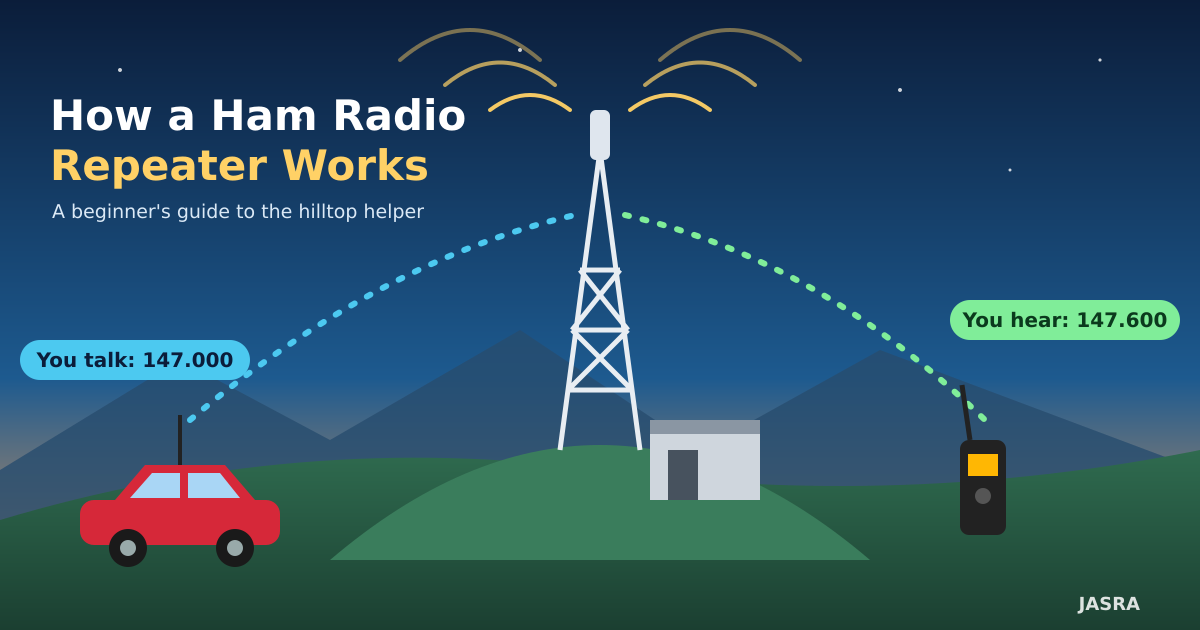
A repeater is an automatic radio station placed in a high location, such as a hill, a tall tower or a tall building. It listens for your weak signal, then instantly re-transmits it with more power from a much better position.
Think of it like a helpful friend standing on a hill who can see everyone. You shout to your friend, and your friend repeats your message loudly to everyone in the valley.
Why do we need one?
VHF and UHF signals travel mostly in straight lines, almost like light. Hills, buildings and even the curve of the Earth block them. A handheld radio with 5 watts may only reach a few kilometres on flat ground. Raise the antenna to the top of a hill, and the same signal can cover an entire region.
- Height gives the repeater a clear view over obstacles.
- Power and a good antenna help weak radios be heard.
- Shared access means every licensed operator in range can use it.
The big idea: two frequencies
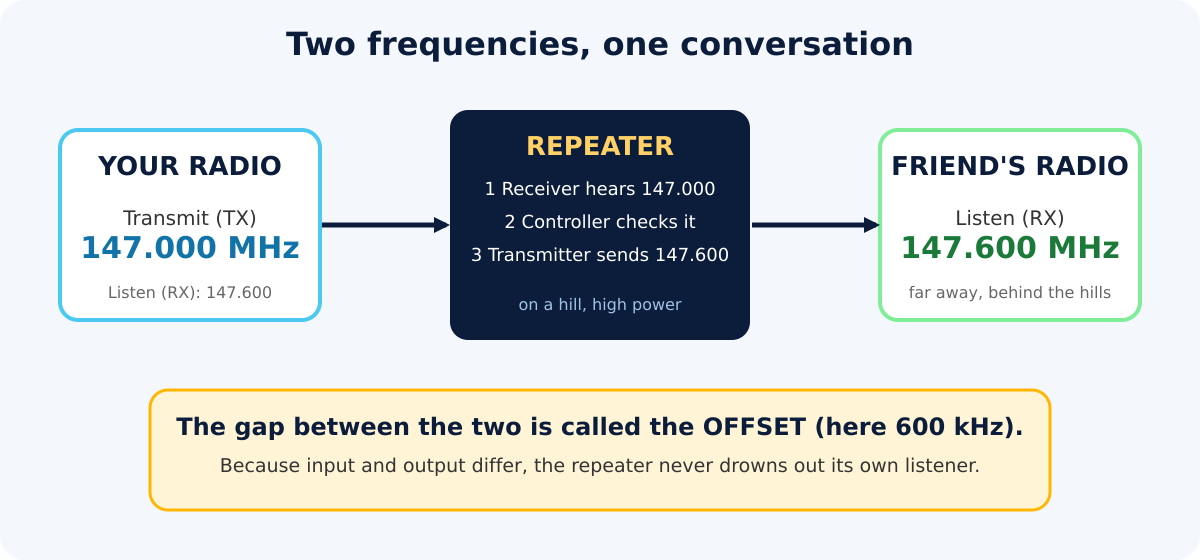
A repeater cannot listen and talk on the same frequency at the same moment, as its own output would drown out the weak signal it is trying to hear. So it uses two different frequencies:
- Input (uplink): the frequency you transmit on, and the repeater listens on.
- Output (downlink): the frequency the repeater transmits on, and you listen on.
For example, you transmit on 147.000 MHz. The repeater receives it, and re-transmits on 147.600 MHz. A friend far away simply listens to 147.600 MHz and hears you clearly. The gap between the two (here 600 kHz) is called the offset or shift.
Good to know: the numbers above are an example to explain the concept. Every repeater has its own frequencies, offset direction and sometimes a tone. Always check the current repeater list for your area before transmitting.
What is inside a repeater?
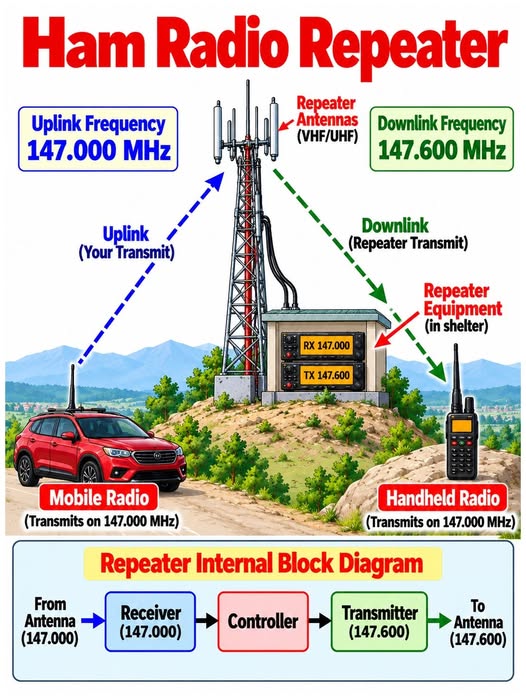
Look at the block diagram in the infographic below. Inside the shelter at the foot of the tower, a repeater has three main parts:
- Receiver picks up your signal from the antenna (147.000 MHz in our example).
- Controller is the brain. It decides when to transmit, adds the courtesy beep, times out someone who talks too long, and sends the station’s callsign in Morse or voice at regular intervals.
- Transmitter sends the cleaned-up audio back out on the output frequency (147.600 MHz).
Most repeaters also use a duplexer, a special filter that lets one antenna listen and talk at the same time without the transmitter deafening the receiver.
Where is it used?
- Local chats and nets. Daily conversations and club meetings on air.
- Emergency coordination. When mobile networks fail during floods or disasters, repeaters keep volunteers connected.
- Mobile and travelling. Drivers stay in touch across a whole state or more.
- Linked networks. Several repeaters can be connected by radio or Internet to cover even larger areas.
Your first call in four steps
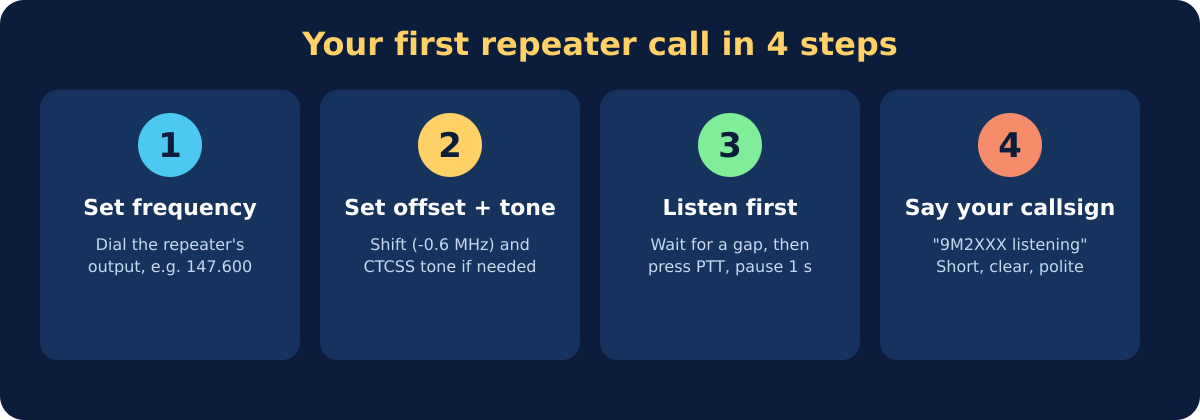
- Set the frequency. Dial the repeater’s output frequency, the one you listen to.
- Set the offset and tone. Most modern radios can store the shift (for example −0.6 MHz) and a CTCSS sub-audible tone, if the repeater requires one. Without the correct setting, it will ignore you.
- Listen first. Wait for a gap in the conversation, press the PTT button, wait one second, then speak. The pause lets the repeater open up so your first words are not cut off.
- Identify yourself. Say your callsign clearly, for example: “9M2XXX, listening.” Keep it short, clear and polite.
Handy repeater manners
- Keep transmissions short. Many people share the same repeater.
- Leave a short gap between overs so others can break in, especially with urgent traffic.
- Use your callsign every ten minutes and at the end of your conversation, as your licence requires.
- Never test by “keying up” without identifying. Say your callsign.
- If you can talk directly (simplex) with your friend, move to a simplex frequency and keep the repeater free.
Quick glossary
| Uplink / Input | What you transmit, and the repeater receives. |
| Downlink / Output | What the repeater transmits, and you receive. |
| Offset (shift) | The gap between input and output frequencies. |
| CTCSS / PL tone | A low, inaudible tone your radio sends so the repeater knows to accept you. |
| Duplex | Transmitting and receiving on two different frequencies. |
| Simplex | Talking directly radio-to-radio on one frequency. |
| PTT | Push-to-talk button. |
Final thought
A repeater turns a small, low-power radio into a regional communicator, and it does so thanks to the volunteers who build, power and maintain it on a hilltop. As a new operator, treat it with respect, listen before you talk, and enjoy the conversation. See you on the air!
Inspired by an educational post from Electronics R&D. Illustrations prepared for JASRA. This article was written with the help of an AI assistant and reviewed before publishing.


